
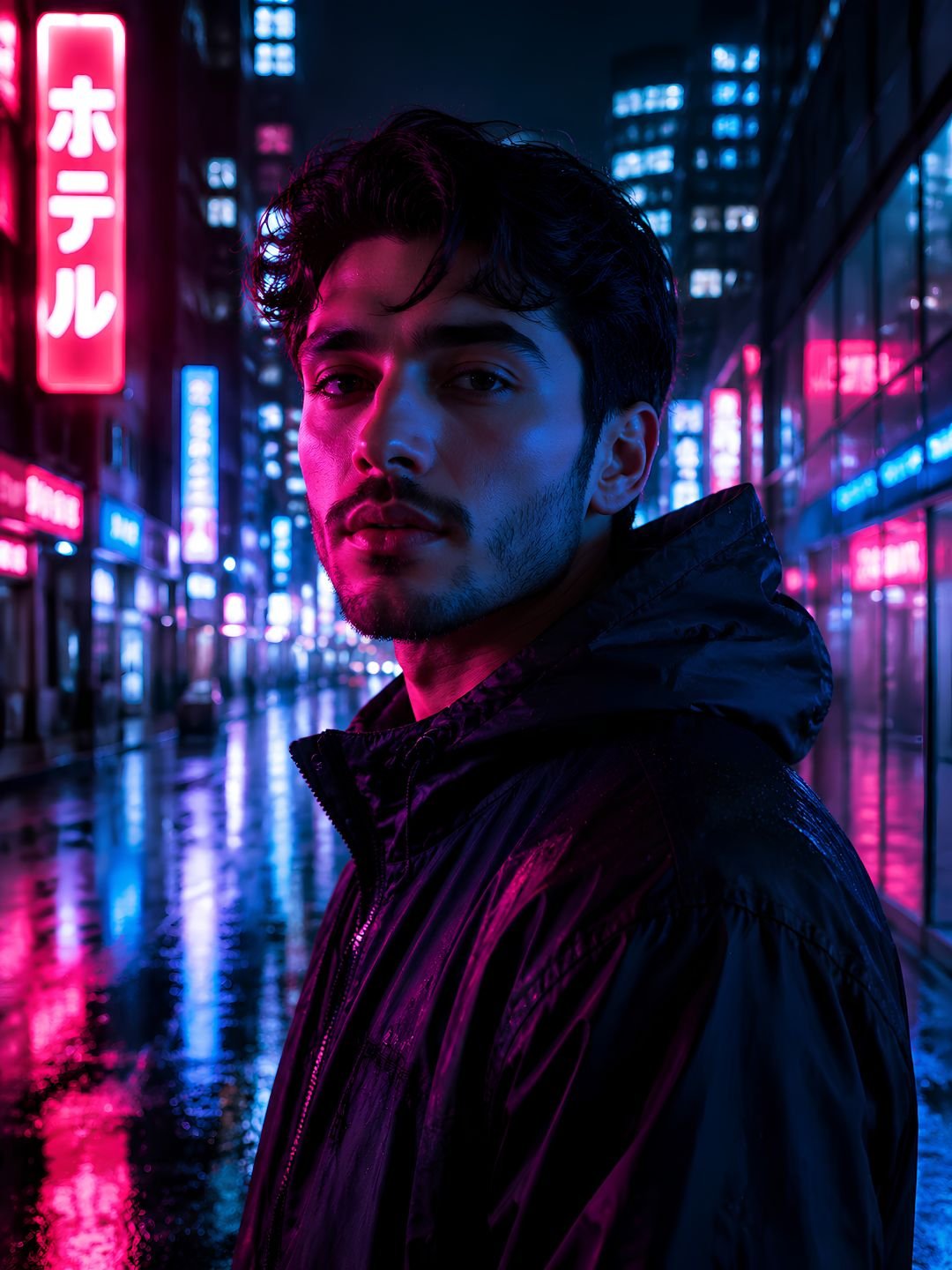
This cyberpunk neon portrait prompt gives you a moody, film-style character shot lit entirely by city signage. Pink and blue light hits the face from two sides, wet pavement throws reflections back up, and the background blurs into soft neon bokeh. It works in Gemini and ChatGPT without any editing — paste it in and you get a usable result on the first try.
The prompt
A cinematic portrait of a young man standing on a rain-soaked city street at night, lit by pink and blue neon signs on both sides of his face. Wet asphalt reflects the neon glow. Background is a blurred cyberpunk street with glowing shopfront signs and light haze. Shot on 85mm lens, shallow depth of field, f/1.8. Sharp focus on the eyes, soft falloff on the shoulders. Moody, high contrast, photorealistic, 4K detail.
What this prompt does
Every part of this prompt is doing a specific job.
- Pink and blue neon on both sides creates split lighting. This is the single detail that makes a photo read as cyberpunk instead of just “dark”.
- Rain-soaked and wet asphalt give the model a reason to add reflections, which doubles the amount of colour in the frame.
- 85mm lens, f/1.8 tells the model to compress the background and blur it. Without a lens spec, most AI models render everything in focus, which looks flat and fake.
- Sharp focus on the eyes stops the model from softening the face, which is the most common failure in low-light portraits.
Best settings
| Aspect ratio | 3:4 for portraits, 9:16 for phone wallpapers or Reels |
| Gemini | Works as-is. Ask for “photorealistic” in your follow-up if the first result looks illustrated. |
| ChatGPT | Add “photograph, not illustration” at the end. |
| Midjourney | Add –ar 3:4 –style raw for a more photographic result. |
3 variations
Female subject, warmer tone
Replace “a young man” with “a young woman” and change “pink and blue neon” to “magenta and warm amber neon”. This gives a softer, less clinical look that works better for fashion-style shots.
Rooftop version
Swap “standing on a rain-soaked city street” for “standing on a rooftop overlooking a neon-lit city”. Add “city lights blurred far below”. The background becomes a wide bokeh field instead of a street, which reads more cinematic.
Close-up crop
Add “extreme close-up, face fills the frame” and remove “soft falloff on the shoulders”. Best when you want a profile picture rather than a full scene. Keep the neon direction, otherwise the lighting loses its shape.
Common mistakes
- Asking for too many colours. Two neon colours is the limit. Add a third and the model spreads them evenly, which kills the split-lighting effect.
- Skipping the lens spec. Without “85mm” and an f-stop, the background stays sharp and the image looks like a game screenshot.
- Adding “beautiful” or “stunning”. These words push the model toward an over-smoothed, plastic face. Describe the light instead.
- Using it in daylight scenes. This prompt depends on darkness. Remove “night” and the neon has nothing to contrast against.
Frequently asked questions
Does this cyberpunk portrait prompt work in ChatGPT?
Yes. Paste it into ChatGPT with image generation enabled. Add “photograph, not illustration” at the end, because DALL-E leans toward a stylised look by default.
How do I change the subject’s appearance?
Replace “a young man” with your own description — for example “a woman in her thirties with short dark hair”. Keep the lighting and lens parts of the prompt unchanged, since those are what create the cyberpunk look.
Why does my result look like a cartoon?
Add “photorealistic photograph” at the start and remove any style words you added. Most models default to illustration when the prompt has no photographic anchor.
Can I use these images commercially?
That depends on the model you use. Check the terms for Gemini, ChatGPT or Midjourney, since each one has different rules for commercial use.
More prompts like this
Try the night street portrait prompt for a similar mood with softer lighting, or the 4K city wallpaper prompt if you want the same neon look without a subject. For a full set, see our 15 realistic AI portrait prompts guide.
Browse all image prompts.